Virginia Mobile ID and ID in Apple Wallet: How to Set Them Up
Virginia offers two ways to carry your driver’s license or ID card on a phone, and they are not the same product. The Virginia Mobile ID is a free DMV app you enroll in yourself. ID in Apple Wallet adds your credential to the Wallet app on an iPhone. DMV says plainly that neither one replaces your physical card — you keep carrying that either way.
The two options at a glance
| What | Virginia Mobile ID app | ID in Apple Wallet |
|---|---|---|
| Cost | Free to download and maintain | DMV’s page does not state a cost |
| Where you get it | App Store and Google Play | Inside the Apple Wallet app |
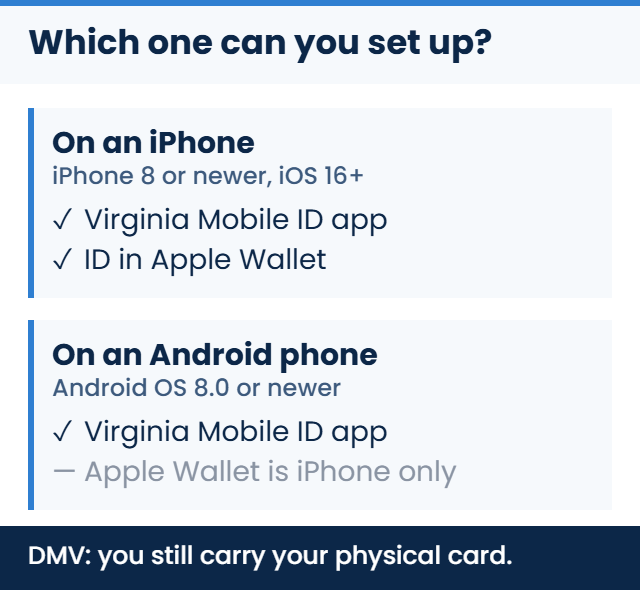
| Devices | iPhone 8 with iOS 16 or newer, or Android OS 8.0 or newer | iPhone and Apple Watch, up to two iPhones and one Watch |
| Airports DMV names | 350+ US airports, six of them in Virginia | More than 250 US airports, six of them in Virginia |
| Replaces your card? | No | No |
Those two airport figures are DMV’s own, published on each product’s page. They differ because the pages describe different products, not because one is out of date.
These are two separate products
DMV documents these on separate pages, with separate enrollment, separate device requirements and separate lists of where they work. Setting up one does not give you the other.
The practical difference is what each one is aimed at. The Virginia Mobile ID app is DMV’s own credential app, and DMV’s page names Virginia State Police and local law enforcement among the places it is accepted. The Apple Wallet version lives in the wallet you already use for cards and tickets, and DMV’s FAQ for it is more cautious about police: it tells you to say your license is in Apple Wallet and wait for the officer’s instructions, and adds that “not all law enforcement agencies have the same acceptance capabilities.”
How to set up the Virginia Mobile ID app
You need a valid Virginia driver’s license or ID card, and a phone running iOS 16 or newer on an iPhone 8 or later, or Android OS 8.0 or newer. DMV publishes the enrollment steps in this order:
- Download and launch the Virginia Mobile ID app from the App Store or Google Play.
- Review and accept the Terms and Conditions.
- Unlock and authenticate your phone.
- Scan the barcode on the back of your license or ID.
- Complete the liveness check by aligning your face in the oval and following the prompts to move closer.
- Follow the remaining prompts.
That sequence is DMV’s, quoted from its Mobile ID FAQ, not an order we assembled.
One thing worth knowing before you rely on it: if you change phones, DMV says you download the app and go through enrollment again, and your old Mobile ID becomes invalid once the new one loads on the new device.
How to add your license to Apple Wallet
DMV describes this one briefly and points to Apple for the full detail. DMV’s FAQ describes it in this order: on your iPhone, open Apple Wallet, tap the Add button, tap Driver’s License or State ID and choose Virginia, then follow the onscreen instructions to scan the front and back of your physical card. DMV’s FAQ says the credential can live on up to two iPhones and one Apple Watch.
DMV also says the Wallet version updates automatically when you renew your license. If a renewal is what brought you here, our guide to renewing a Virginia driver’s license online or in person covers that separately.
Where each one is actually accepted
Beyond the airport figures in the table above, DMV lists the app as accepted at 25 Virginia ABC pilot stores in the Richmond and Northern Virginia areas, at DMV itself for appointments and identity verification, by Virginia State Police and local law enforcement, and at other businesses and organizations. DMV calls those ABC locations pilot stores, so treat the number as where things stood when the page was written rather than a permanent ceiling.
For ID in Apple Wallet, DMV’s FAQ names businesses and organizations with compliant mobile ID readers, and select apps that require identity or age verification.
There is one point where a Virginia DMV page and a federal page do not line up, and it is worth knowing before you get to an airport. DMV’s Apple Wallet FAQ describes acceptance at TSA checkpoints in more than 250 US airports. TSA’s own list of participating states and eligible digital IDs shows the VA MiD app as Virginia’s eligible digital ID. We are not going to tell you which one governs at the podium, because TSA runs the checkpoint and its list is the thing that changes. Check TSA’s current page before you plan on using a phone to fly — and note that TSA’s own advice is that travelers should always carry a physical, acceptable form of ID, which is the same thing DMV says.
Outside airports, DMV’s Mobile ID FAQ is direct about the app’s reach: “in most cases, your Virginia Mobile ID can only be used in Virginia at this time.”
What neither one does
The DMV pages state these limits plainly.
- Neither replaces your physical card. DMV says the Mobile ID is “a companion to your physical ID,” and its Apple Wallet FAQ says the Wallet version “does not replace your physical driver’s license or ID card, and you must continue to carry your physical card.”
- Neither guarantees any particular place will take it. DMV’s own Apple Wallet FAQ says acceptance capabilities differ between law enforcement agencies. No source consulted for this article certifies a specific store, venue or officer.
- Neither requires you to hand over your phone. DMV says the app works by contactless scan and “your phone never leaves your hand,” and that with Apple Wallet “you do not need to unlock, show, or hand over your device.”
What a reader gets scanned is not open-ended either. DMV says the app presents only the information needed for the interaction, and that you can review and authorize what is being requested before it is shared; for Apple Wallet it says the reader receives the same information they would from your physical license.
What DMV’s pages do not say
Three gaps are worth naming, because their absence is information too.
Losing your phone. DMV’s Mobile ID FAQ explains what happens when you get a new device. It does not address a lost or stolen phone. For the Apple Wallet version, DMV points to Apple’s Find My app to remotely lock or erase the device.
Expiry. Nothing on the Mobile ID FAQ consulted for this article states whether the app credential expires or has to be renewed on its own schedule.
Other phone wallets. The DMV pages consulted here cover the Virginia Mobile ID app and ID in Apple Wallet. Neither page mentions Google Wallet or Samsung Wallet, and a page not mentioning something is not the same as DMV ruling it out — if you are on Android, the app is the route those pages describe.
If you are setting a phone up for DMV business more broadly, what you can and cannot do online with Virginia DMV is a separate question with its own answer.
Common questions
Do I still need my plastic license if I have both?
Yes — and holding both digital versions does not change it. Each product’s DMV page states the requirement separately, so carrying one is not an alternative to carrying the other, and neither is an alternative to the card.
I have an Android phone. What are my options?
The Virginia Mobile ID app is available on Google Play and DMV lists Android OS 8.0 or newer as the minimum. ID in Apple Wallet is an iPhone and Apple Watch feature, so it is not an Android option.
Does the app need a signal to work?
DMV’s Mobile ID page says that once the app is downloaded, no cell signal is needed. The FAQ we consulted does not repeat that, so treat it as DMV’s statement on the product page rather than something confirmed in two places.
Can I use my Virginia Mobile ID in another state?
DMV’s FAQ says that apart from the airports TSA determines, “in most cases, your Virginia Mobile ID can only be used in Virginia at this time.” If you are traveling and expect to prove your identity outside an airport, plan on the physical card.
Official sources
- Virginia DMV — Virginia Mobile ID
- Virginia DMV — Virginia Mobile ID Frequently Asked Questions
- Virginia DMV — ID in Apple Wallet
- Virginia DMV — ID in Apple Wallet FAQ
- TSA — Participating States and Eligible Digital IDs
Official sources last verified: September 9, 2026. Where these digital IDs are accepted is set by DMV and, at airport checkpoints, by TSA — confirm current details with each before you rely on a phone alone.